Jettbet Casino login page banner
Start with 200% match + 100 FS — deposit just EUR 20

Registerwith bonus

Jettbet Official Login: Access Your Account Securely with Email and Password

Jettbet Casino login takes under 30 seconds - enter your email and password, and you get instant access to 5000+ games, live casino tables, sports betting and your personal cashier. This guide covers every login scenario: standard web sign-in, mobile browser access, password recovery, 2FA setup and what to do when access fails. Whether you are logging in for the first time or returning after a break, the steps here apply to both desktop and mobile on any browser.

Why Logging In Unlocks Everything

A Jettbet account without an active session is just a browse mode. The moment you sign in, the platform switches to full functionality: real-money games, cashier access, bonus activation, VIP points tracking and live betting. Without login, none of these features respond.

The login step is your account's primary security gate. Your balance, transaction history and KYC documents remain locked until you confirm identity with email and password - or an optional 2FA code. Even if someone knows your email address, they cannot access your funds without the second credential.

UK and international players hold their accounts in EUR by default, since GBP is not a supported currency at Jettbet. Every balance figure, bonus amount and cashier limit displayed after login is calculated in whichever currency you selected at registration.

Open Jettbet Casino

How to Sign In: Step by Step

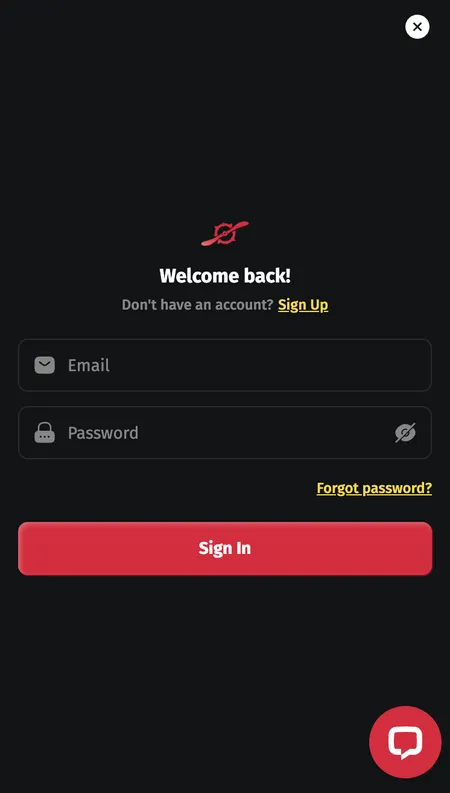
  1. Jettbet login form with email and password fields

    Go to the Jettbet website and click the Login button in the top-right corner of the header. The sign-in form opens immediately - no redirect to another page.

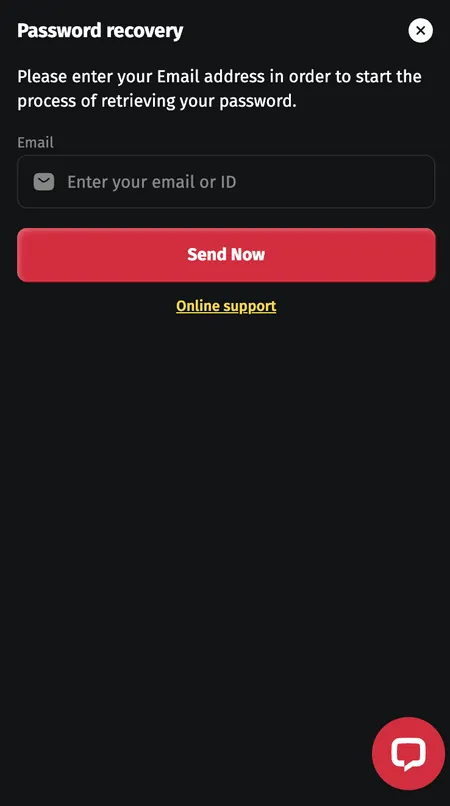
  2. Jettbet password reset screen

    If you forgot your password, click the recovery link on the login form. Enter your email address or account ID, then press Send Now. A reset link arrives within a few minutes. You can also open live chat directly from this screen.

The Login Form in Detail

The Jettbet sign-in form is built around two mandatory fields and one supplementary option:

Field What to Enter
Email The address used during registration
Password Case-sensitive, minimum 8 characters
Forgot Password Link to the recovery screen

Below the fields is a toggle that switches between Login and Register - useful if you landed on the wrong screen. There is no social login (Google, Facebook) at this time; email and password are the only credentials accepted.

After a successful login, the page reloads to your personalised lobby. Your balance appears in the header, and the cashier icon becomes active.

Signing In on Mobile

Jettbet has no downloadable app for iOS or Android. Instead, the casino runs as a fully optimised browser site compatible with Chrome, Safari, Firefox and Edge on both platforms.

The mobile login experience mirrors the desktop version exactly. The Login button sits in the same top-right position, the form fields are touch-friendly and the keyboard does not obscure the Submit button on standard screen sizes.

One practical tip: use your browser's password manager to save credentials. On iPhone, Safari integrates with iCloud Keychain; on Android, Chrome offers the built-in password manager. Both allow Face ID or fingerprint unlock, which effectively gives you biometric login without a dedicated app.

Session persistence works well on mobile - if you do not manually log out, the session stays active for a standard browser session period. Clearing browser data or using private/incognito mode will require you to log in again on the next visit.

Play at Jettbet

Recovering Your Password

If the password is lost or forgotten, the recovery process starts from the login screen:

  1. Click the forgot password link under the password field.
  2. Enter either your registered email address or your numeric account ID.
  3. Press Send Now - a reset email is sent to your inbox.
  4. Open the email and follow the reset link; it expires after a short window.
  5. Set a new password and log in immediately.

If the email does not arrive within five minutes, check your spam folder. If the address is no longer accessible, contact the 24/7 live chat support - agents respond in under a minute and can verify your identity through account ID and KYC data.

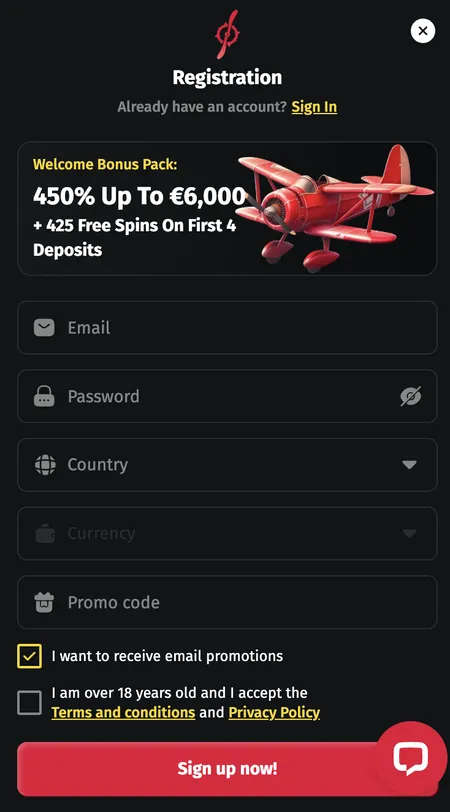
Jettbet registration form showing email, password and country fields

New to Jettbet? The registration form takes about three minutes to complete. Once your account is created, you can log in immediately and claim the welcome bonus.

Login on Different Devices

Jettbet supports simultaneous sessions but the cashier and bonus systems track activity per account, not per device. Here is how login behaves across common setups:

Device Browser Support Notes
Windows / Mac desktop Chrome, Edge, Firefox, Safari Full feature parity
iPhone / iPad Safari, Chrome Touch-optimised form
Android phone / tablet Chrome, Firefox Portrait and landscape
Smart TV browser Varies Not officially supported

There is no device limit for active sessions. However, for security reasons it is good practice to log out of shared or public computers after each session.

✓

Jettbet uses SSL encryption on all connections and supports two-factor authentication (2FA) for account protection. Enabling 2FA means a compromised password alone is not enough to access your account.

Two-Factor Authentication Setup

2FA at Jettbet adds a second verification step after password entry. Once enabled in your account security settings, each login requires a time-based one-time code from an authenticator app (such as Google Authenticator or Authy).

Steps to enable:

  • Open your profile settings after logging in.
  • Navigate to the security section and select enable 2FA.
  • Scan the QR code with your authenticator app.
  • Enter the six-digit code shown in the app to confirm setup.

If you lose access to your authenticator app, contact support with your account ID and KYC documents to regain access. Recovery codes should be saved at setup time.

Register at Jettbet

KYC and Your First Login

Account creation and initial login do not require KYC documents. You can log in, browse games and even make deposits without identity verification. However, Step 1 KYC - filling in your full name, date of birth, country and address - becomes mandatory before your first withdrawal can be processed.

Extended verification (Step 2) triggers automatically when a single deposit or withdrawal exceeds GBP 2000. At that point, you will be asked to upload a photo ID and a handwritten note with a randomly generated six-digit code.

Standard KYC documents are reviewed within one business day. The dedicated KYC email address is separate from general support; using the correct channel speeds up processing.

Common Login Problems and Fixes

Most login failures fall into a small set of categories:

Problem Likely Cause Solution
'Invalid credentials' error Wrong email or password typo Reset password via recovery link
Page not loading Network issue or browser cache Clear cache, try incognito mode
2FA code rejected Time sync off on phone Resync phone clock, regenerate code
Account locked Multiple failed attempts Wait 15 min or contact live chat
Email not recognised Registered with different address Try other addresses or contact support

If none of these resolve the issue, live chat at Jettbet connects you to an agent in under 60 seconds, 24 hours a day, seven days a week, in twelve languages.

✕

Jettbet does not support login via social accounts (Google or Facebook). Your email and password from registration are the only accepted credentials. Keep them stored securely.

After Login: What You Can Access

Once signed in, the following become active immediately:

  • Cashier - deposit from GBP 20 using Visa, Mastercard, Skrill, Neteller, cryptocurrencies (BTC, ETH, USDT, LTC, DOGE, TRX, BNB) and other methods.
  • Bonus activation - welcome package up to GBP 6000 plus 425 free spins triggers on first deposit; no-deposit bonus of 20 free spins on Sweet Bonanza available with promo code JETTBET20 at registration.
  • VIP points - every GBP 100 wagered with real money earns 1 loyalty coin; points and current VIP level are visible in the profile section.
  • Responsible gambling tools - deposit limits, loss limits, reality checks and self-exclusion options are all in the account settings.
  • Sports betting - the sportsbook covering 40+ sports and esports (CS2, League of Legends) becomes fully functional.

For a full overview of what the platform offers after login, visit the Jettbet Casino home page or explore all slots and games at Jettbet.

Jettbet enforces a single pending withdrawal request at any time, which means your account must be in a clean state before you can transact. After logging in, check the cashier section first: if an earlier withdrawal is still processing, you will need to wait for it to complete or cancel it before submitting a new one. The financial team handles requests Monday to Friday, 09:00 to 17:00 GMT+1, so weekend logins show a queue rather than an instant decision. Knowing this rhythm helps you plan deposits and withdrawals without surprises.

Two-factor authentication adds a second confirmation step after your email and password are accepted. You can enable 2FA directly inside your account settings once logged in. When active, each new session generates a one-time code that must be entered before the platform grants full access to the cashier, bonus wallet and personal data. If a code fails to arrive, check that the phone number or authenticator app linked to your account is still active. Disabling 2FA or switching the linked device requires identity confirmation through support, so keep your KYC documents ready before making that change.

Two-factor authentication (2FA) at Jettbet adds a second verification step after your password is accepted. Once enabled in your account security settings, each login triggers a one-time code sent to your registered device. Entering that code within the time window completes the sign-in. If you lose access to your 2FA method, live chat support operates around the clock and can guide you through identity verification to restore access without locking you out permanently.

After logging in, your personal dashboard shows accumulated loyalty points, your current VIP tier and your position on any active tournament leaderboard. These figures update in real time, so a winning session reflects immediately in your points balance. Players on VIP levels 3 and above also see elevated cashback rates and higher weekly withdrawal limits directly from the dashboard - a practical reason to check your profile after each session rather than just heading straight to the Jettbet bonuses page.


Ready to play? Sign in to Jettbet Casino and access 5000+ games, live tables and sports betting - all in one account.

Login FAQ

What do I use to log in to Jettbet?

Your registered email address and password. There is no social login option. If you set up 2FA, you will also need the current six-digit code from your authenticator app.

I forgot my Jettbet password - how do I reset it?

Click the forgot password link on the login form, enter your email or account ID and press Send Now. A reset link arrives by email. If the email does not appear within five minutes, check your spam folder or contact live chat.

Can I log in on my phone without downloading an app?

Yes. Jettbet has no downloadable app. Open any mobile browser (Chrome, Safari, Firefox) and go to the Jettbet site. The login form is fully touch-optimised and works on iOS and Android.

Why does Jettbet keep logging me out?

The session ends when you clear browser data, use private/incognito mode or the session token expires after inactivity. Saving your credentials in a password manager makes re-login fast.

My 2FA code is not working - what should I do?

The most common cause is a time sync issue on your phone. Open your authenticator app settings and resync the time. If the problem persists, contact support with your account ID to disable 2FA and re-enable it.

Is my login information stored securely?

Yes. Jettbet uses SSL encryption on all connections. Passwords are stored in hashed form and are never visible to support staff. Enable 2FA for an additional layer of protection.

Can I be logged in on two devices at the same time?

Yes, Jettbet does not restrict simultaneous sessions. However, for security on shared or public devices, always log out manually after your session.

What happens if I enter the wrong password too many times?

After repeated failed attempts, the account may be temporarily locked. Wait approximately 15 minutes and try again, or contact 24/7 live chat support to unlock it faster.

Do I need to verify my identity before I can log in?

No. KYC verification is not required to log in or to make deposits. It becomes mandatory before your first withdrawal is processed (Step 1) and for transactions above GBP 2000 (Step 2).

What currency will I see after logging in?

Your account currency is set at registration. Jettbet supports EUR, AUD, BRL, CAD, NZD, NOK, PLN and CHF as fiat options, plus several cryptocurrencies. UK players are recommended to use GBP as their working currency.